⏱️ Time Duration Calculator
Calculate the exact hours, minutes, and seconds between two times instantly
Calculate Duration Between Two Times
Duration Results
How to Use the Time Duration Calculator
Our advanced time duration calculator is a simple yet powerful tool designed to instantly calculate the exact time elapsed between two moments. Whether you're using a time calculator to track work hours, measuring event duration with our time calculator minutes feature, or calculating time duration for projects, this calculator time duration tool provides accurate results in multiple formats. Find out how much time you've spent on tasks using our comprehensive elapsed time calculator feature.
Step-by-Step Guide
- Enter Start Date & Time: Click the date field and select when your event or period begins. Use the "Now" button to automatically fill in the current date and time.
- Enter End Date & Time: Select the date and time when your event or period ends. Again, use "Now" for instant current time capture.
- Click Calculate Duration: Press the "Calculate Duration" button to process your inputs and instantly get your hour duration calculator results.
- View Your Results: The calculator displays results in four formats:
- Total Hours (with decimal precision)
- Total Minutes (from time in minutes calculator)
- Total Seconds
- Formatted Time (HH:MM:SS)
- Share or Copy: Use the sharing buttons to post results on social media or copy to clipboard for pasting elsewhere.
- Employee Time Tracking: Calculate total hours worked during a shift, including breaks and lunch periods using our time duration calculator
- Project Management: Determine time spent on specific tasks and projects for better resource allocation - our hour duration calculator makes this easy
- Event Planning: Measure event duration from start to end, useful for scheduling and capacity planning
- Travel & Commute: Track elapsed time for trips, flights, or daily commutes with our elapsed time calculator
- Fitness & Workouts: Monitor exercise duration and training session lengths - how much time did you spend exercising?
- Billing & Invoicing: Calculate billable hours for freelancers and service providers
- Media & Content: Measure audio, video, or podcast episode duration with our time calculator minutes feature
- Studying & Training: Track study session length and learning time investment
Our calculator uses the ISO 8601 time standard for universal compatibility and accuracy.
Understanding Time Duration Results
| Result Type | Format | Example | Use Case |
|---|---|---|---|
| Total Hours | Decimal format | 8.5 hours | Payroll, billing hourly rates |
| Total Minutes | Whole number | 510 minutes | Task timing, video duration |
| Total Seconds | Whole number | 30,600 seconds | Precise timing, sports, science |
| Formatted Duration | HH:MM:SS | 08:30:00 | Human-readable, stopwatch format |
Real-World Applications
Advanced Features & Calculator Capabilities
Beyond basic time calculations, our advanced time calculator duration includes several powerful features designed to handle complex scenarios and provide maximum flexibility for calculating time duration accurately.
Multi-Day Duration Calculations
Unlike simple time calculators, this tool accurately handles durations spanning multiple days, weeks, months, and even years. Whether calculating time duration for an overnight shift, a weekend project, or a multi-month timeline, the hour duration calculator processes everything correctly.
Accuracy & Precision
The calculator provides precision down to the second, accounting for:
- All variations in month lengths (28-31 days)
- Leap years and leap seconds
- Time zones (when specified)
- Daylight saving time considerations
Real-Time Validation
The calculator includes smart validation that:
- Prevents calculations when end time is before start time
- Validates all date and time formats
- Displays clear error messages for invalid inputs
- Automatically highlights errors for quick correction when using our time duration calculator
Instant Result Sharing
Share your calculations instantly across multiple platforms:
- Twitter: Tweet your results with pre-formatted text
- Facebook: Share with your network
- WhatsApp: Send results via messaging
- Clipboard: Copy results for pasting anywhere
Why Decimal Hours Matter: Complete Guide for Payroll & Billing
One of the most common questions we receive is: "Why does my calculator show 8.73 hours instead of 8 hours 44 minutes?" This is actually the correct way to represent time for payroll, billing, and professional timekeeping. Understanding decimal hours when using our time duration calculator is crucial for accurate compensation, invoicing, and financial reporting.
Understanding Decimal Hours (Decimal Time)
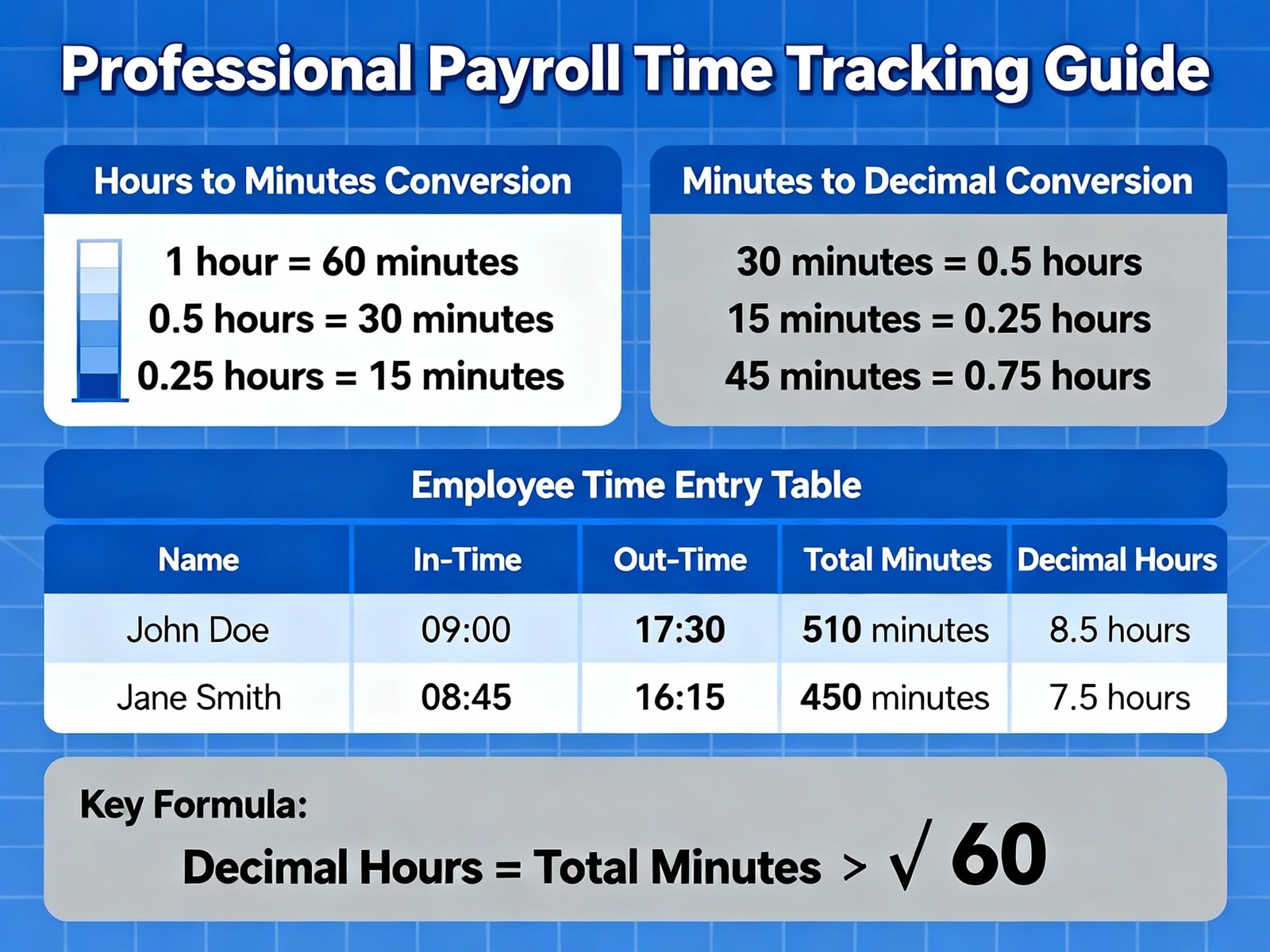
Decimal hours is a system where time is expressed as a decimal number representing total hours and fractions thereof. Instead of breaking time into hours and minutes (8:44), it's shown as a single number (8.73). When using our hour duration calculator or time in minutes calculator, this format is the industry standard for:
- Payroll Processing: HR systems and payroll software use decimal hours for wage calculations
- Billing & Invoicing: Freelancers, consultants, and service providers calculate hourly rates using calculator time duration tools
- Time Tracking: Professional time tracking apps (Toggl, Harvest, Clockify) display decimal hours from elapsed time calculator features
- Project Management: Tracking billable hours and project profitability
- Legal & Compliance: Labor law compliance requires accurate time tracking in decimal format
The Math Behind Decimal Hours
Converting between decimal hours and traditional time (HH:MM) is simple mathematics when using our time calculator duration:
Example: 8 hours 44 minutes 0 seconds
= 8 + (44 ÷ 60) + (0 ÷ 3600)
= 8 + 0.7333 + 0
= 8.73 hours ✓
Payroll Calculation Example
Here's why this matters for your employees and business:
| Time Format | Start Time | End Time | Duration (HH:MM) | Decimal Hours | At $50/Hour |
|---|---|---|---|---|---|
| Correct (Payroll) | 9:00 AM | 5:00 PM (minus 1 hr lunch) | 7:44 | 7.73 | $386.50 ✓ |
| Wrong (If using HH only) | 9:00 AM | 5:00 PM (minus 1 hr lunch) | 7:44 | 7 (rounded down) | $350.00 ❌ |
Difference: Using only hours would underpay the employee by $36.50!
Decimal Hours Conversion Chart
Here's a quick reference for common time conversions using our time calculator minutes:
| Minutes | Decimal Hours | Uses |
|---|---|---|
| 6 minutes | 0.10 | Quick task, email check |
| 12 minutes | 0.20 | Brief meeting, follow-up call |
| 15 minutes | 0.25 | Quarter hour, short break |
| 30 minutes | 0.50 | Half hour, lunch break |
| 45 minutes | 0.75 | Three-quarter hour, long meeting |
| 60 minutes | 1.00 | Full hour |
Why Our Calculator Uses Decimal Hours
Our time duration calculator provides all four formats for maximum flexibility:
| Format | Example | Best For | Accuracy |
|---|---|---|---|
| Decimal Hours | 8.73 | Payroll, billing, how much time calculations | Perfect for rates/minute precision |
| Total Minutes | 524 | Quick reference, timing (time in minutes calculator) | Good for minute-level tracking |
| Total Seconds | 31,440 | Scientific, precise timing | Second-level precision |
| Formatted (HH:MM:SS) | 08:44:00 | Human reading, stopwatch format | Easy to understand |
Industry Standards & Compliance
Our time calculator duration follows industry standards used by major payroll systems and regulatory bodies:
- ADP & Paychex: Leading payroll processors use decimal hours for accurate calculations
- QuickBooks: Standard time entry format is decimal hours
- Toggl time tracking & Harvest: Professional time tracking displays decimal hours
- Labor Law Compliance: Fair Labor Standards Act (FLSA) requires accurate time tracking—decimal hours ensure this
- Accounting Standards: GAAP accounting standards and IFRS recommend decimal format for time tracking
Tips for Accurate Payroll Management
- ✅ Always use decimal hours for payroll calculations
- ✅ Train employees on decimal hour format to reduce confusion
- ✅ Use our time duration calculator for instant verification of time entries
- ✅ Round to nearest 0.25 (15-minute increments) for consistency
- ✅ Keep records in both formats (HH:MM and decimal) for compliance
- ✅ Verify calculations before processing payroll
- ✅ Communicate clearly with employees about how their time is tracked
Frequently Asked Questions About Time Duration Calculator
Related Time & Date Calculators
Explore our comprehensive collection of time and date calculation tools for all your calculating time duration needs: